●
Enterprise Platform · Embedded UX · End-to-End Product Design
Octolux
I led and owned this product end-to-end — designing a modular
industrial UX ecosystem that cuts embedded product development
time by up to 73% and takes a machine from concept to validated
production in 12 weeks.
Role
Lead Product UX Designer
Ownership
End-to-End
Platform
Desktop · Embedded ·
Browser
Recognition
#1 Award-Winning HMI
73%
Faster
Development
Reduction in
embedded
product
development
costs and
time
12wks
Concept
to
Validated
Product
Engineers
define
and fully
validate
an AI-
powered
HMI
system
80%
Faster Testing
Manufacturing
validation
workflow
improvement
post-
implementation
#1
Award-Winning
HMI
Recognized as
top HMI platform
in its category
01 · Overview
Octolux isn't just a product — it's a complete development ecosystem
that solves one of embedded engineering's oldest problems: why
does it take 6 months just to test a new machine?
Every time NTX Embedded — or any industrial company —
started a new product, they rebuilt everything from scratch.
Custom boards, custom firmware, custom UI, custom
testing tools. Engineers spent months on hardware
iterations before they could validate a single idea. The
testing process alone routinely took 4–6 months. Time,
money, and engineering talent were burned on duplication
instead of innovation.
I was brought in to design the UX system for Octolux RDS
(Rapid Development System) — a modular platform that
bundles pre-validated hardware, firmware, and UI into a
single ecosystem. The goal: get any embedded product
from concept to validated production in 12 weeks, with any
PCB or machine fully testable through the same software.
This was a new concept with no direct precedent inside the
company. I led the design from initial research through
delivery —
conducting interviews with 10 engineers, 3
close collaborators, and 4 senior stakeholders
including
the CEO and VP of Engineering to validate the problem and
the solution.


Traditional Development


Spec

PoC
EVT
DVT

PVT
SCHEDULE RISK!


Unplanned overlap


Hardware Development

!

FW delayed
by HW wait
DVT

Octolux RDS


✓
73%
Lower Dev Costs
✓
PoC & EVT
In one Step
✓
PoC to DVT
In 12 Weeks
faster to market
Octolux RDS Development


PoC + EVT bonded
Sprint 1

DVT

DVT

R
PVT

HW DV

FW Dev

✓

1.0
PVT


12 weeks

12 weeks
Spec

Currently in customer testing. Octolux RDS is deployed
with early adopters and NTX is actively collecting
performance and validation data. Full production launch
in progress.
02 · The Problem
Six months to test a machine. There had to be a better
way.
Before Octolux, a control engineer at an industrial company faced the same painful
journey every time they started a new product. The testing process wasn't just slow —
it was structurally broken. The same problems repeated project after project with no
shared solution.
Traditional Development — The Problem
✗
Hardware and firmware developed in isolation —
firmware team waits months for hardware to be ready
✗
PoC and EVT phases overlap unplanned — creating
schedule risk and rework cycles
✗
4–6 months of testing before a product is validated
— burning engineering time on duplication
✗
Every new project rebuilds the same architecture
from scratch — boards, UI, testing tools, firmware
✗
Diagnostics require expert firmware engineers to
interpret — QA and manufacturing can't work
independently
✗
No standardized testing platform — inconsistent
results across teams and projects
Octolux RDS — The Solution
✓
PoC and EVT bonded — effort combined in Sprint 1,
hardware and firmware co-developed in parallel
✓
Structured sprint cycles — 12 weeks to DVT, 12 weeks
to 1.0 production release
✓
73% reduction in development costs — pre-
validated building blocks eliminate duplication
✓
Any PCB or machine testable through the same
platform — fully configurable via JSON, no rebuild
required
✓
Browser-based validation tool — QA runs complete
test cycles without engineering involvement
✓
Edge AI analyzes live data and surfaces diagnostic
answers — engineers make faster, better decisions
Traditional
Development
4–6 months to validated product
SCHEDULE RISK
Octolux RDS
12 weeks
73% reduction in development time · Hardware and firmware co-developed · PoC + EVT bonded in Sprint 1
"We've removed the extremely long engineering cycle of hardware iterations.
Now, control is in the hands of the system engineer. RDS reduces
design time,
costs and risks
allowing them to achieve a fully validated product that adds in-
demand AI and advanced control capabilities."
— Bob Griswold, VP of Engineering, NTX Embedded
03 · Design Challenges
Three layers of complexity — technical, operational,
and human.
Infinite Machine Variability
Every industrial machine has
different boards, sensors,
actuators, and I/O configurations.
The platform needed to work with
any hardware combination
without custom UI development
per product.
Two Very Different User Types
Control engineers need deep
configuration power. Operators
need fast, clear, real-time data.
One monolithic interface can't
serve both well — they needed
purpose-built, connected
experiences.
HMI Performance Constraints
Embedded devices have limited
processing power. Loading
configuration logic onto the HMI
would slow real-time data
rendering — the most critical
function during machine
operation.
Diagnostics Needed to Be
Self-Serve
Every test cycle required a
firmware engineer to interpret
results. This bottleneck was one
of the primary causes of the 4–6
month timeline. The interface
needed to surface answers, not
raw data.
Entirely New Concept
There was no existing product to
reference or improve. The
platform was a new idea — which
meant the design process had to
validate the concept itself before
designing the interface for it.
Scalability Across Industries
Refrigeration, pump stations,
medical devices, food service
equipment, gate systems — the
UX architecture needed to work
across fundamentally different
machine categories without
rebuilding per product.
04 · Research & Discovery
We didn't design a solution. We researched one.
Because this was a new concept, the research phase was critical. We needed to
validate that the problem was real, understand the full scope of the workflow pain,
and prioritize which capabilities would actually change how engineers worked —
before designing a single screen.
10
Engineer Interviews
3
Deep Collaboration Partners
4
CEO & VP Stakeholder
Reviews
6+
Research Methods Used
Research Methods
Competitive & Market Analysis
Reviewed existing embedded testing
platforms, HMI tools, and development
workflows across competitors to identify
gaps
Engineer Interviews & Internal Sessions
10 interviews with hardware and firmware
engineers, close collaboration with 3 core
team members throughout the project
Past Customer Feedback Analysis
Reviewed previous customer pain points
and experiences with the old development
process to ground the design in real history
Card Sorting & Feature Prioritization
Used card sorting to understand how
engineers mentally organized the system,
then prioritized features through structured
brainstorming sessions
Surveys & Usability Testing
Validated concepts with low-fidelity
prototypes before committing to high-
fidelity design, tested with engineers on
real tasks
01
The bottleneck was workflow, not hardware
Engineers consistently reported that the longest delays weren't
caused by technical limitations — they were caused by
fragmented tooling, waiting for other teams, and re-doing work
that should have been reusable. The problem was structural.
02
Diagnostics needed to give answers, not raw data
When something failed, engineers spent significant time
interpreting what the raw sensor data meant. The interface
showed values — but not meaning. Edge AI analyzing data live and
surfacing conclusions was identified as the highest-value
capability.
03
Configuration and operation must be separate
Card sorting revealed that engineers mentally separated "setting
up the system" from "running the system" as completely different
modes. Mixing them on one interface created confusion. This
directly informed the OC + HMI split architecture.
04
Low-fi prototypes revealed concept viability first
Because the platform was a new concept, I prototyped the core
flows at low fidelity and tested them before investing in high-
fidelity design. This phase was longer than typical projects — the
definition and design phases required extensive prototype
iteration to validate the concept itself.
Research Session Photo
Add your user testing / card sorting photo
here
Card sorting session — engineers organizing
system concepts to reveal their mental models
Low-Fi Wireframes
Add your early wireframe / sketch photo
here
Early low-fidelity prototypes tested with
engineers before committing to high-fidelity
design
Brainstorming / Feature
Prioritization
Add your feature prioritization / brainstorm
photo here
Feature prioritization workshop — aligning
engineering, product, and stakeholder needs
Note: Research photos from the old case study version — add your actual session photos here for maximum impact.
05 · The Core Design Decision
Split the system: one side for configuration, one side
for operation.
The most important design decision wasn't visual — it was architectural. Research
showed that engineers mentally separated configuration from operation as
completely different modes. Rather than forcing them into one interface, I designed
two purpose-built connected systems. This also solved the HMI performance
problem: by keeping configuration on the desktop, the embedded device stays
lightweight and focused entirely on real-time data.
OC — Desktop Configuration App
→
Engineer selects hardware elements — boards,
sensors, actuators, modules
→
Configures sensor logic, functions, thresholds, and
behaviors
→
Maps I/O and defines control parameters step by
step
→
Saves complete configuration as a portable JSON
file
→
Sends JSON to the HMI — no manual setup on the
device
→
Full desktop power for complex configuration
workflows
→
Embedded HMI — Operational Interface
→
Receives JSON config from OC and renders the
correct UI automatically
→
100% focused on real-time data — sensor readings,
alarms, motor controls
→
Lightweight by design — no configuration logic
running on device
→
Edge AI analyzes live data and surfaces diagnostic
answers
→
Built in HTML — any machine type can run it in a
browser
→
Guided operational workflows — cleaning cycles,
diagnostics, alerts
JSON config flows OC → HMI · Configuration complexity stays off the embedded device · HMI stays fast and focused on live data
Why HTML for the HMI? Using HTML for the embedded interface means any machine type can run it in a browser
— no custom display framework required per product. This directly enables the platform's universal machine
compatibility and accelerates deployment across new products.
06 · My Role
I led and owned this product end-to-end.
This wasn't a project where I received specs and designed screens. I was the
sole designer and product UX lead — responsible for product strategy,
research, system architecture, interaction design, design systems, validation UX,
and cross-team coordination throughout the full development cycle.
Product Strategy
Defined the OC + HMI split
architecture, the JSON config
model, and the scalability logic
that makes the platform work
across any machine type
UX Research
10 engineer interviews,
competitive analysis, past
customer feedback, card sorting,
feature prioritization, surveys, and
usability testing with low-fi
prototypes
OC Desktop App
Designed the full configuration
tool — hardware selection wizard,
sensor logic builder, function
editor, I/O mapping, and JSON
export workflow
Embedded HMI
Designed the operational
touchscreen interface — real-time
dashboards, diagnostics, alarms,
motor controls, and guided
cleaning workflows
Design System
Built the complete Octolux
component library from scratch —
reusable cards, status indicators,
alarms, navigation, and operational
widgets documented for future
products
Stakeholder Leadership
Ran concept reviews with CEO and
VP stakeholders, aligned
engineering and manufacturing
teams, structured project
milestones and delivery planning
07 · Systems Architecture
Five modular layers — each reusable, each
composable.
A new industrial product joins the platform by configuring the existing layers — not
rebuilding them. This is what enables the 73% development time reduction.
UI Layer
HMI Framework
OC Config App
Interaction Models
Alarm Hierarchy
Design System
Software
Linux / RTOS
Node-RED
Rust Engines
MQTT Sparkplug
JSON Config
Hardware
Control Boards
HMI Boards
I/O Modules
Motor Control
Any PCB
AI + Cloud
Edge AI
Live Analysis
OTA Updates
Remote Diag.
Data Logging
Validation
Browser Tool
Board Testing
I/O Verify
Diagnostics
Mfg. Workflow
08 · Design Solutions
Three connected products. One design system.
OC — Desktop Configuration App
The OC app gives engineers complete control over system configuration without touching the HMI. I
designed a step-by-step hardware selection wizard where engineers pick every board and module they
need, then configure sensor logic, thresholds, and control behaviors — all exported as a portable JSON
file that tells the HMI exactly what to display.
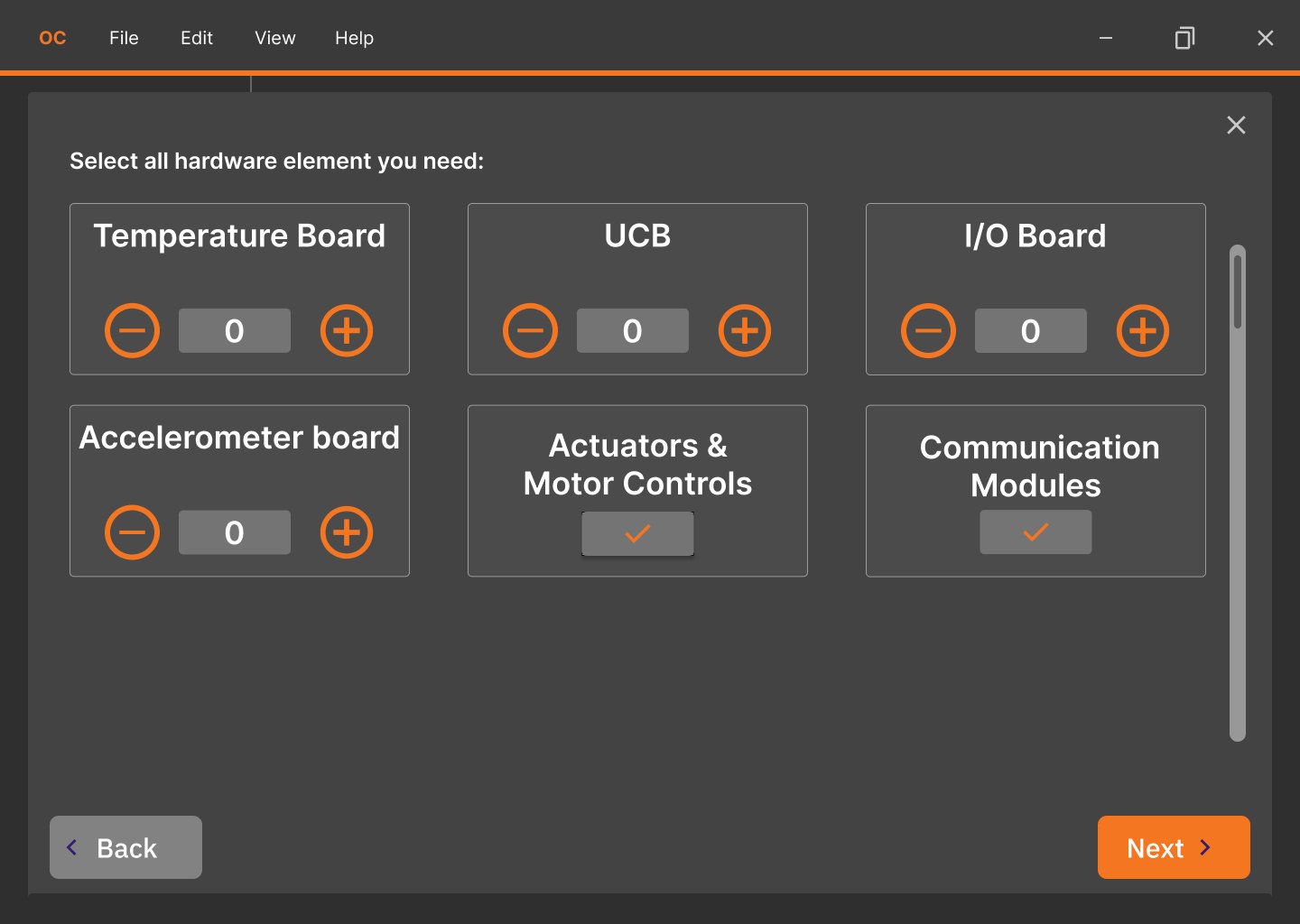
1
Hardware selector —
engineers choose boards
by type with quantity
controls. Each selection
dynamically updates the
JSON config.
2
Step navigation —
Back/Next keeps engineers
in a linear flow. Complex
configuration never
requires jumping between
disconnected settings
pages.
Hardware Selection Wizard. Engineer selects Temperature Board,
UCB, I/O Board, and other modules — the platform configures
automatically.
3
Sensor logic builder —
define threshold → event →
action chains. Engineers
configure machine behavior
without writing code.
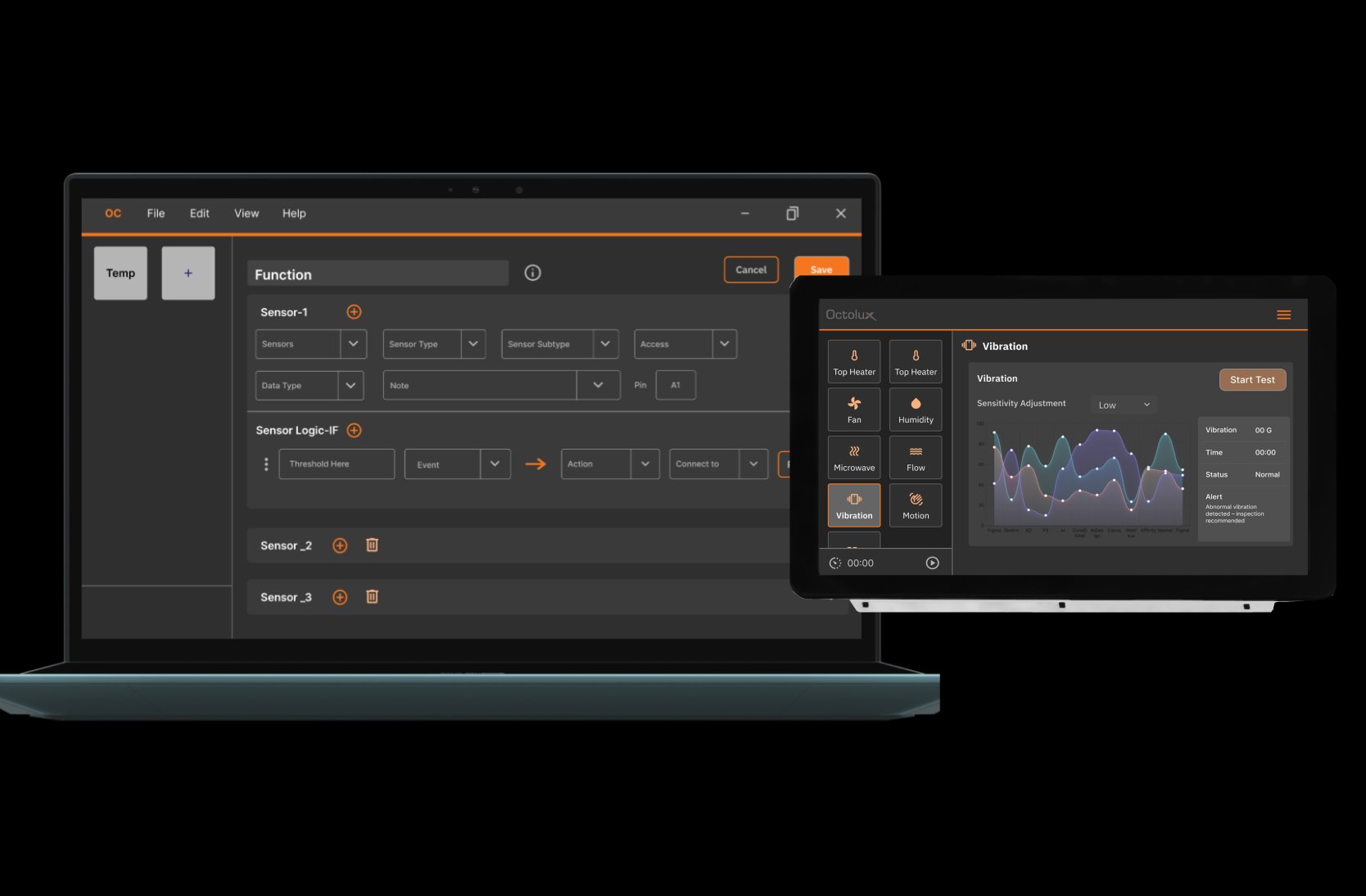
4
Live HMI preview on the
right — shows the resulting
operational interface as
configuration is saved and
sent.
Function Editor + Live HMI. OC on the laptop configures sensor
logic; HMI on the tablet reflects the result in real time.
Hardware Selection Wizard
Sensor Logic Builder
JSON Export
Step-by-Step Configuration
No-Code Machine Setup
Octolux Play — Embedded HMI
The HMI receives the JSON config and renders the correct operational interface automatically. Its
sole job
is live data
— real-time sensor readings, motor controls, diagnostics, and guided workflows. Because all
configuration logic lives in OC, the device is lightweight and its full processing power goes to data
accuracy and display speed.
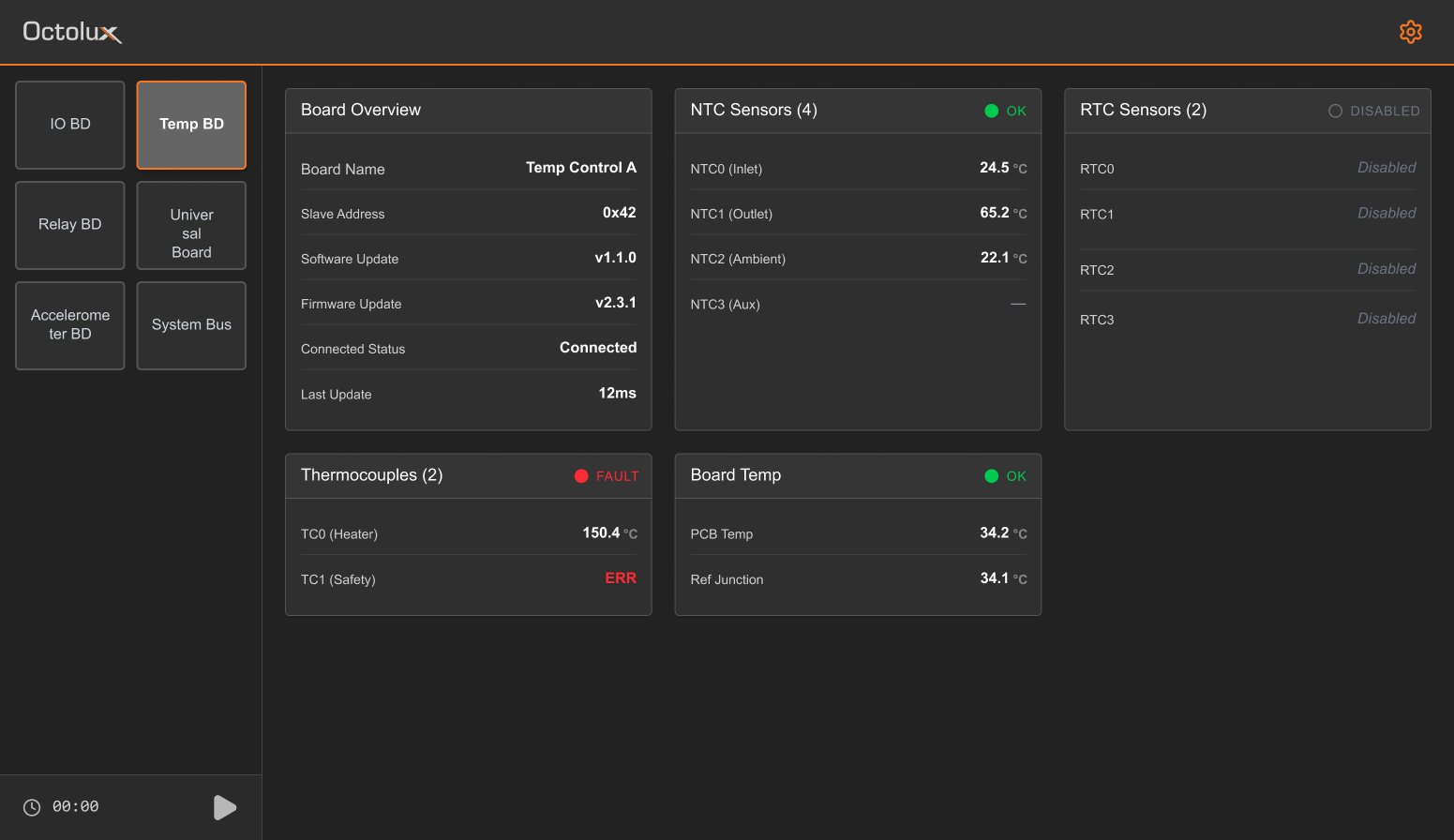
1
Board selector sidebar — engineers
navigate between boards (IO, Temp,
Relay, System) in one tap.
2
Status indicators (OK / FAULT /
DISABLED) surface machine health at a
glance — no interpretation required.
Board Diagnostics. TC1 Safety shows ERR
in red — fault state is immediate and
unmissable. Edge AI can surface the likely
cause.
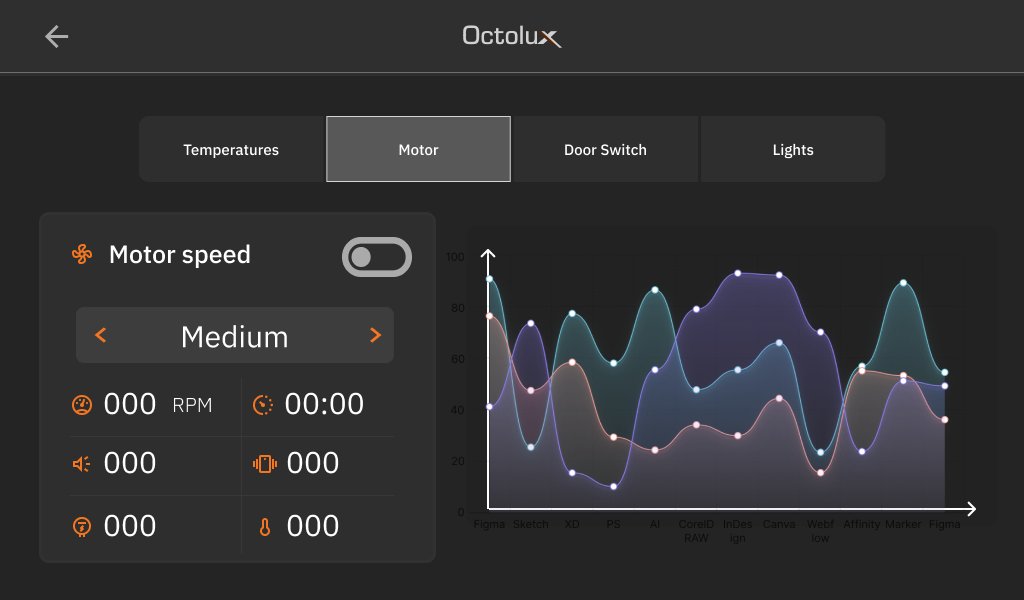
3
Tab navigation separates sensor
categories — Temperatures, Motor,
Door Switch, Lights. Operators stay in
context.
4
Live data chart with real-time
visualization — engineers see trends,
not just point-in-time values.
Motor Control. Speed, RPM, run time, and
vibration displayed with live chart
visualization for trend analysis.
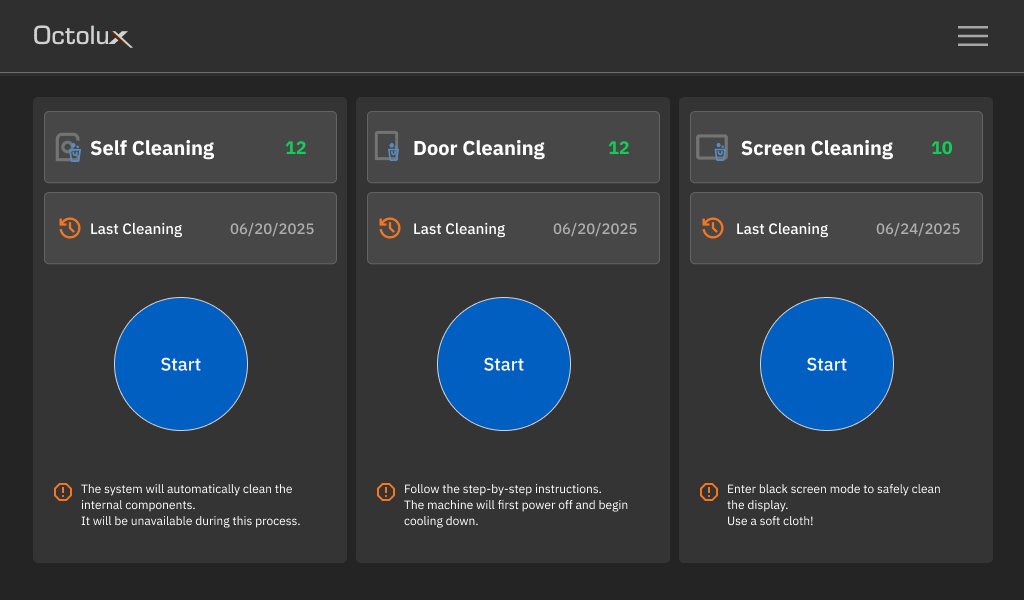
5
Three distinct cleaning workflows —
Self Cleaning (automated), Door
Cleaning (guided steps), Screen
Cleaning (safe mode). Each has clear
cycle count and last-run tracking.
Guided Maintenance Workflows. Large
Start buttons, contextual warnings, and
last-cleaning dates reduce maintenance
errors.
Real-Time Dashboards
Fault Detection
Motor Controls
Edge AI Diagnostics
Guided Workflows
HTML-Based
Touch Optimized
09 · UX Strategy
Six principles that guided every design decision.
Separate Complexity from Operation
Configuration complexity belongs on the desktop.
The HMI should be focused and fast. The OC/HMI
split enforces this at the architecture level — a
constraint that improves both systems.
Diagnostics Should Give Answers, Not Data
Engineers shouldn't have to interpret raw sensor
values to understand what's wrong. Edge AI analyzes
live data and surfaces conclusions — the interface
shows meaning, not just numbers.
Operational Clarity First
Every interface decision was measured against one
question: does this reduce cognitive load for an
engineer under time pressure? Fault states, alarms,
and system health are impossible to miss.
Progressive Disclosure
Show only what's relevant to the current task. Board
details, sensor subtypes, and advanced
configuration are revealed in layers — operators see
the minimum needed to act, not everything at once.
Universal Machine Compatibility
Every component adapts to any machine type via
JSON configuration. The same screens, the same
design system, and the same interaction patterns
work for refrigeration, pump stations, medical
devices, and more.
Industrial Accessibility
Sunlight-readable contrast, glove-friendly touch
targets (minimum 44×44px, recommended
56×56px), high-contrast fault states, and large-
format data displays designed for demanding
environments.
10 · Project Timeline
A new concept required a longer definition phase.
Because this was an entirely new product concept, the definition and design
phases were significantly longer than a typical project. We needed to validate the
idea itself — through low-fi prototyping and iterative testing — before committing
to high-fidelity design. The longer upfront investment paid off in a more validated,
scalable architecture.
10 · Project Timeline
A new concept required a longer definition phase.
Because this was an entirely new concept, the definition and design phases were significantly longer than usual. We needed to validate the idea itself through low-fi prototyping and iterative testing before committing to high-fidelity design.
Discovery
6–8 wks
Definition ★ Longest
10–12 wks
Design
12–16 wks
Delivery
4–6 wks
01 · Discovery
Research & Market Analysis
10 engineer interviews, competitive research, past customer feedback, and VP workshops. Core finding: the bottleneck is workflow, not hardware.
10 Interviews
Competitive Analysis
Customer Feedback
02 · Definition · Longest Phase
Concept Validation & Architecture
New concept = longer definition. Card sorting, feature prioritization, brainstorming, and low-fi prototype testing defined the OC/HMI split and JSON config model.
Card Sorting
Low-Fi Prototypes
CEO/VP Reviews
03 · Design
High-Fidelity & Design System
Designed OC Config, Embedded HMI, and Validation Tool. Built the complete Octolux design system from scratch. Multiple usability testing rounds with engineers.
High-Fi Figma
Design System
Usability Testing
04 · Delivery
Launch & Customer Testing
System Design Documentation produced. Platform deployed to early adopters — currently in customer testing with live data collection underway.
Live Testing
System Design Doc
Data Collection
11 · System Design Documentation
A fully documented UX system — not just a finished
product.
As the design lead, I produced a complete system design document covering
visual language, operational framework, interaction logic, component standards,
and architecture principles. This document is the foundation for all current and
future Octolux products — any designer or engineer can build on it without starting
from scratch.
Design Philosophy
Operational Clarity & Systems UX
Two-mode framework: Configuration (setup,
provisioning, mapping) and Play/Operate (monitoring,
diagnostics, alarms, control). Industrial accessibility,
scalable components, human-centered operational
workflows.
Visual System
Color, Typography & Hierarchy
Structured status colors for green/amber/red/gray
states. Intel Typeface throughout. H1 32–40px Bold to
Body 14–16px Regular. Hierarchy built from weight and
size, not color alone.
Accessibility
Industrial Environment Standards
Sunlight readability, glove interaction, high contrast
layouts. Minimum touch target 44×44px, recommended
56×56px. Designed for operators under stress, in
protective equipment, in bright or low-light conditions.
Component System
Reusable Library Built From Scratch
Full component library: cards, status indicators, alarm
modules, navigation systems, diagnostics widgets, and
operational controls — all built to adapt to any machine
type via configuration, not custom code.
Alarm & Diagnostics
Three-Tier Alarm Hierarchy
Informational, Warning, Critical — designed for rapid
interpretation under pressure. Edge AI integration
surfaces diagnostic conclusions rather than requiring
engineers to interpret raw fault data.
Scalability
Platform, Not Product
All workflows, components, and system structures
support future products without rebuilding. New machine
types join the platform by configuring existing layers —
the design system is the enabler of the 73% development
time reduction.
📄 Download Octolux RDS Product Flyer
12 · Impact & Results
Measurable outcomes across development speed,
manufacturing, and platform reach.
73%
Development Cost Reduction
Octolux RDS reduces embedded
product development costs and
time by up to 73% through pre-
validated modular building blocks
12wks
Concept to Validated Product
Engineers define and fully validate
an AI-powered HMI/control system
in 12 weeks — down from 4–6
months
80%
Faster Testing Workflow
Manufacturing validation workflow
improvement — QA teams run
complete test cycles
independently without engineering
involvement
#1
Award-Winning HMI
Platform recognized as the top HMI
system in its category — validating
the design approach of operational
clarity and scalable architecture
6+
Industries Served
Industrial machinery, food service,
medical devices, transportation,
security systems, machine tooling
— one platform, configurable for all
Live
In Customer Testing
Currently deployed with early
adopter customers — NTX is
actively collecting performance
data to refine the platform before
full production launch
"We've removed the extremely long engineering cycle of hardware iterations.
Now, control is in the hands of the system engineer."
— Bob Griswold, VP of Engineering, NTX Embedded · See full product page
13 · What I Learned
Designing a new concept is a different kind of
problem.
The best design decisions are architectural, not
visual
The OC/HMI split wasn't a visual decision — it was a
systems architecture decision. Choosing to separate
configuration from operation at the product level made
every screen easier to design, every machine easier to
support, and every engineer's work faster. Architecture
is UX.
New concepts need longer definition phases
When there's no existing product to improve, you have
to validate the concept itself before designing it. The
extended definition and prototype phase wasn't a delay
— it was the most important work. Rushing to high-
fidelity on an unvalidated concept is how you build the
wrong product confidently.
Diagnostics should give answers, not require
interpretation
The key research finding — that engineers spent
significant time interpreting raw fault data — reframed
what the HMI needed to be. The interface isn't just a
window into the machine. It's a translator. Edge AI
making that translation automatic changed what "good
diagnostics UX" meant.
Owning the product end-to-end changes
every decision
When you're responsible for strategy, research,
architecture, design, and delivery — every tradeoff is
yours to own. That accountability sharpened every
decision. I wouldn't design it differently, and I learned
more on this project than any other in my career.
Let's work together.
I work best at the intersection of research, complexity, and real human impact, whether that's a consumer health platform, a regulated enterprise product, or something entirely new. If you're building something that matters to the people who use it, let's talk.

